

In last week’s post, we explored a basic aspect of clarity in strata records – filenames – and how they help us achieve clarity in strata records, with a view to being able to process or think about those records sensibly.
And it will come as no surprise to you that this week, we’re looking at
We’re once again interested in the first two definitions of that word:
- The act of presenting, or something presented.
- The outward appearance or representation of a […] thing to the human mind
When preparing strata reports, presentation is the first aspect of how the report is put together by which I hope to draw clear attention to the content.
There are several aspects to presentation – it might incorporate design (including title pages, subsections, fonts, spacing, link styles), and, as we’ll cover in this post:
structure
There are hundreds of things you can do to aid presentation within your file structure – I’ll look at a few which I utilise, and the first follows directly from the filenames of the records I include in my reports.
With the filenames as I described last week, it’s easy in my file management software (DEVONthink Pro, for those interested) to combine those into a single PDF, which then uses the filenames as bookmarks/table of contents entries.
This make navigation and assessment for prospective owners easier as well – here’s a viewer application’s Table of Contents display in one of my reports:
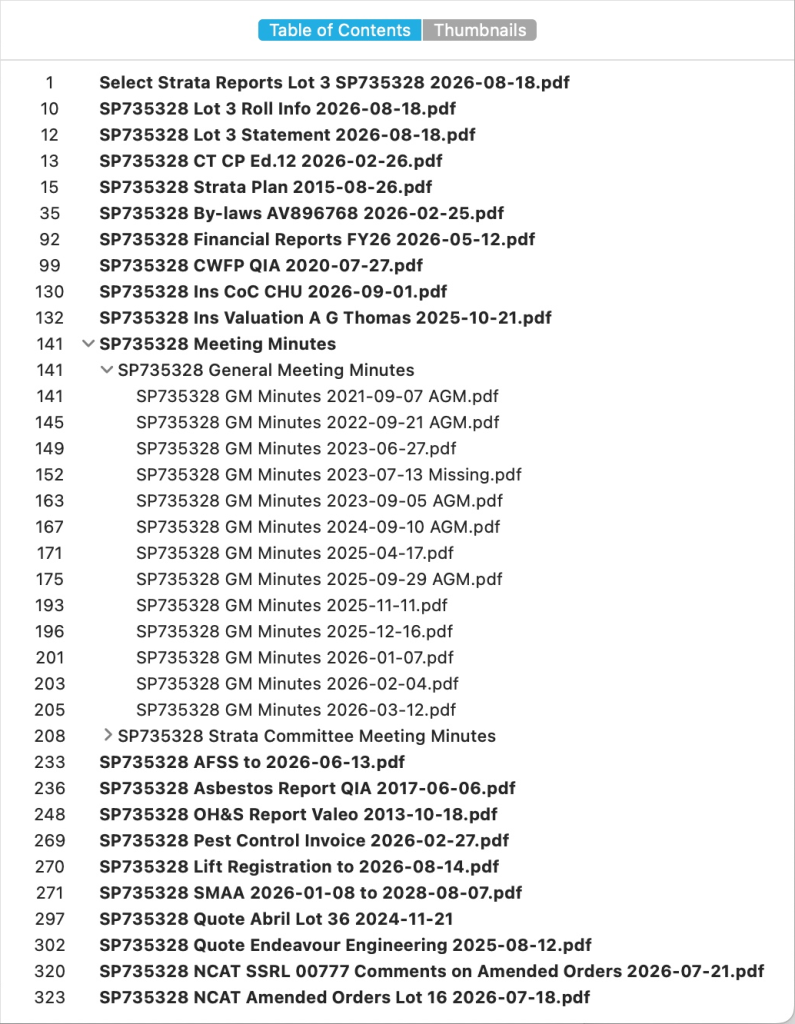
You’ll see how I’ve slightly modified the filename template I presented last week to append some info – for meetings, if a record is missing, that is shown at the end of the filename so the meetings are still shown in date order for GMs (general meetings) and SCMs (strata committee meetings), and if a meeting was part of an AGM (that applies to both general meetings, and the strata committee meeting held immediately after AGMs) they are also kept in order.
I have added a little more structure by moving the meeting minutes into a top-level item, within which are items for each of general and strata committee meetings – that way, the list first shows as a collapsed list with fewer items.
Each of those items in that list are links which point to the first page of that attachment – depending on your PDF viewer, those links are shown in the Bookmarks and/or Table of Contents sections the viewer application can show (and, you might have guessed, those Bookmark and Table of Contents lists are metadata within the PDF file itself).
Those entries are all clickable links, and as a favour to my clients, on every page after my report, I include a “Back” button at bottom right on every page.

This button links back to an attachments list at the end of my report, which allows readers to quickly get back to my report when viewing attachments. With report files often coming to hundreds (and occasionally thousands) of pages, this makes navigation in such behemoths much easier.
Additional structural “amenities” in my reports include:
- The report summary is the first section of the report body, to give an executive overview of my findings more readily
- The sections shown in my reports’ own table of contents are links to those sections
- When report items are shown as “Sighted and attached”, that text is also a link to that attachment
- Where relevant, references to sections of the Strata Schemes Management Act or other legislation or resources are links to the appropriate web location
- If I reference another section of my report (most especially in my report summary), that reference becomes a link to that section
- The last section of my report is a list of attachment types (e.g. “Meeting minutes”, or “Capital works fund plan”), which are clickable links to the first page of those types of attachments
I do all of this to aid my clients to “think clearly and rationally” when they are considering a strata purchase – and I think I have incorporated some structural and navigational features in my reports unique to the industry.
In the next post I’ll handle a particularly problematic aspect of strata inspections and reports, and what can and can’t be done about it – more details next week!
Strata Report Giveaway!
Yes, the offer still stands! I will prepare a free strata report (valued at $385!) for a strata scheme in NSW (remote inspection for management agencies outside Sydney metro area) to the first commenter or contact via the details below who can correctly identify why I use the dummy strata scheme SP735328 (other than its unlikelihood to ever be issued!).
This prize is transferable, so if you or someone you know is looking to buy in strata and needs an independent, professional, and thorough strata report, get solving, get in touch, and maybe get some brownie points!
Leave a Reply